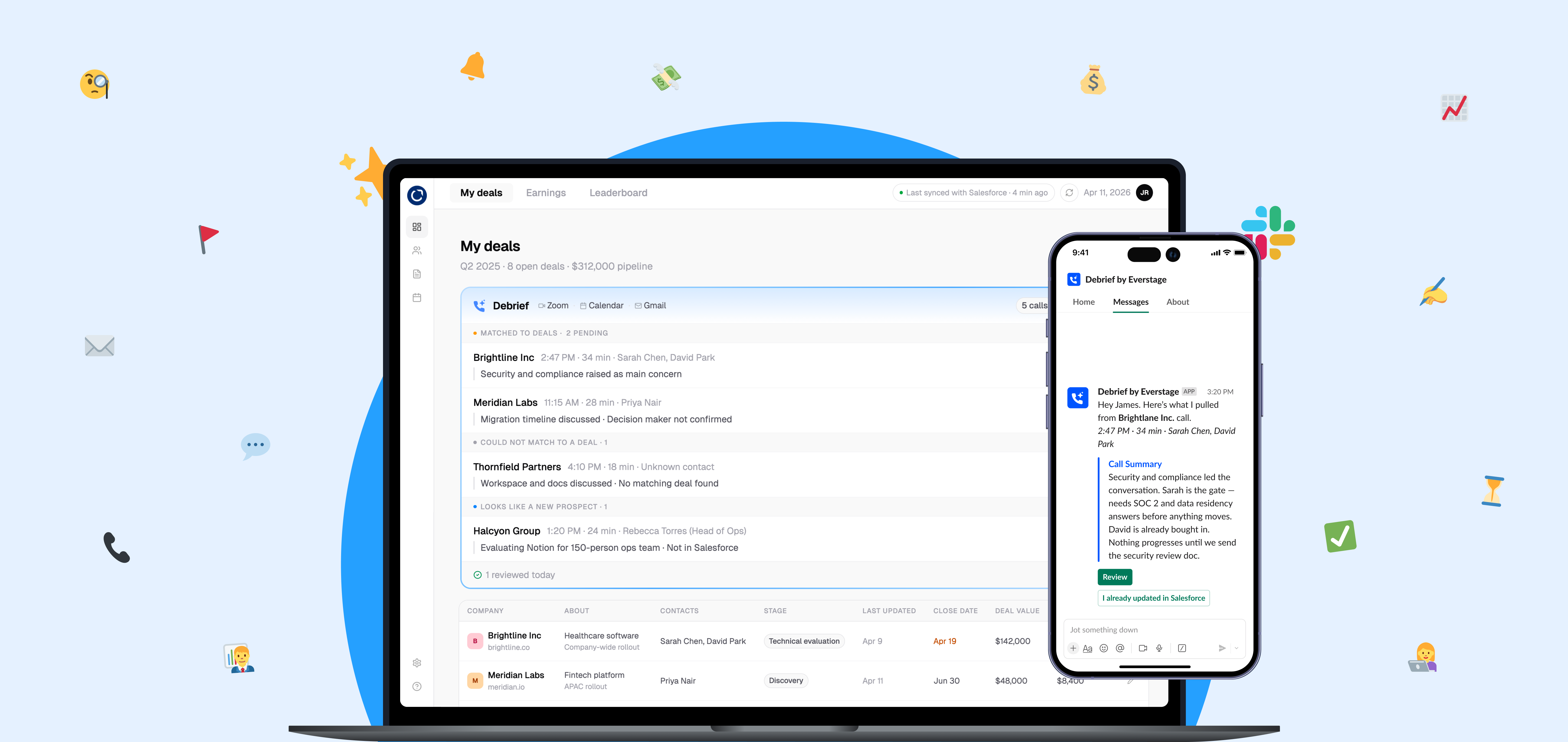
A take-home design assignment for Everstage, a sales commission platform used by companies like Notion, Chargebee, and Postman. The brief: design an AI-powered solution that helps sales reps log calls, update their CRM, and write follow-ups without it feeling like reporting up to someone else. The result is Debrief, a post-call assistant that listens to your calls, does the admin for you, and only syncs to CRM after you confirm it.
Since this case study will refer to sales reps, CRM, and Everstage, I'll provide some context:
A sales rep is the person responsible for bringing in new business. They spend their days on calls with potential customers, trying to understand their problems and convince them their product solves it. For example, a Notion sales rep sells Notion as a product to other companies.
A CRM is where sales reps log everything about a deal: who they spoke to, what was discussed, what happens next. For example, after a sales rep at Notion gets a new deal with Brightlane, they log it onto a CRM like Salesforce.
Everstage sits on top of that. It's a sales commission platform that pulls deal data from the CRM and shows reps exactly how much they're earning in real time. For example, Everstage shows a rep can make $14K by closing the deal with Brightlane.
Sales reps spend a surprising chunk of their day on work that has nothing to do with selling. Logging calls. Updating the CRM. Writing follow-ups.
😩 Between back-to-back calls, a rep's five-minute gap is for breathing, not logging. By end of day the details have faded. What makes it into the CRM is the skeleton of what happened, not the nuance that actually matters for the next call.
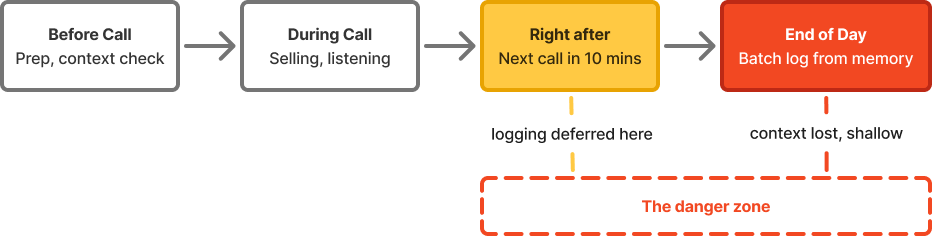
The manager lives downstream of all of this:
Managers forecast on information that is already out of date, incomplete, or missing. A competitor mentioned casually, a decision maker who went quiet, a budget conversation that went sideways: None of that makes it into the CRM because it is nuance, not a field.
A typical sales rep’s day starts by reviewing pipeline and priorities in a CRM like Salesforce CRM or HubSpot CRM, alongside checking emails in Gmail and internal updates on Slack; they then move into prospecting using tools like LinkedIn Sales Navigator, execute outreach via email and calls (often through platforms like Salesloft or Aircall), run meetings on Zoom or Google Meet while taking notes, and then handle post-call admin by updating CRM fields, sending follow-ups, and coordinating internally.
1. Meet reps where they already are: They live in Slack / Teams. A post-call review card could arrive there (no new tab, no new login), right after a call. Zoom / Meet might not be ideal as the reps end calls and immediately jump to their next one — the post-call screen gets closed, not read. We want to add this as a feature to a tool they already use, not yet another tool for their stack.
2. Solve for reps: Every tool trying to fix this hits the same wall. They solve for manager visibility by taxing the rep. Nobody asked what the rep gets out of it. Gong and Clari solve for managers and revops; While Sybill and Scratchpad do solve for admin reduction, they still have an incentive problem. Which takes us to...
3. Everstage as incentive: Reps open Everstage because their commission is in there. This acts as motivation to view their deals.
4. Heavy on integration: Everstage already pushes notifications through Slack, pulls from Salesforce and HubSpot, and has Agent Core running across the platform.
Debrief 💬 listens to your sales calls and does the admin for you. After every call it writes up what happened, flags anything of note, pre-fills your CRM fields, and makes a follow-up email available on demand. Nothing syncs to CRM until the rep confirms so that the data is always confirmed CRM data, never AI inferences.
Debrief's differentiator is not the surface. It is the confirmation step, tied to a motivation the rep already has. Debrief pushes to Slack as a decision point — and the rep's commission accuracy is what's at stake.
The goal is to turn the rep from author to editor.
✅ Ten minutes of logging becomes sixty seconds of reviewing.
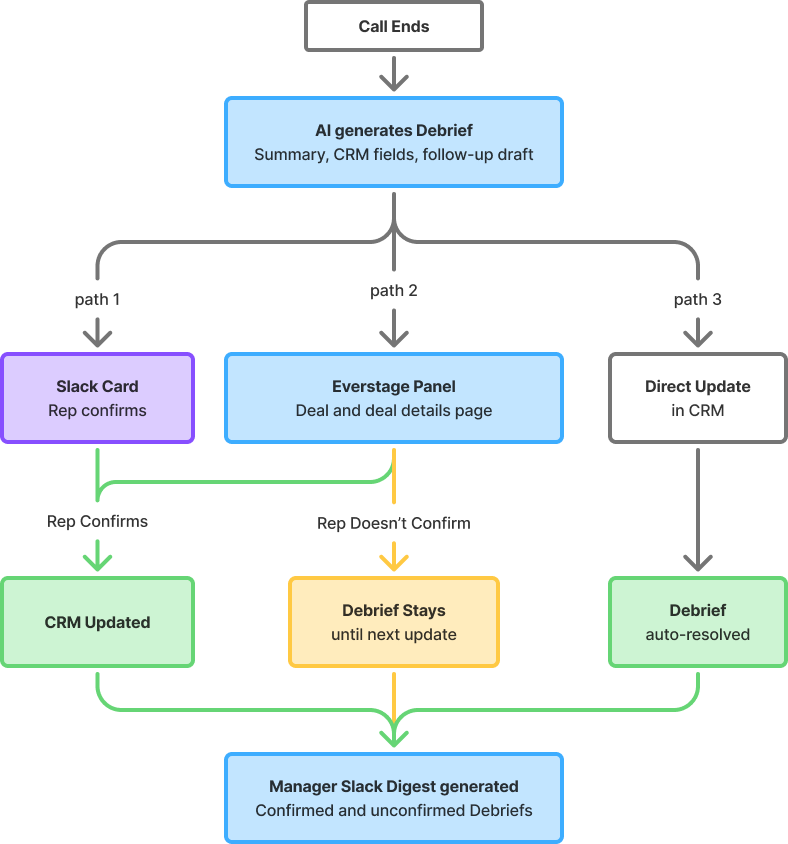
👉 Rep updates the CRM directly (path 3)
Everstage detects that the relevant CRM fields were updated after the call ended and auto-resolves the Debrief.
👉 Rep ignores a Debrief and has a second call with the same client (path 2)
The older Debrief is superseded. Only the most recent call surfaces for review.
✅ In scope: Post-call logging, call summaries, CRM field updates, deal signals, new prospect detection, manager digest, desktop flow / zoom calls.
❌ Out of scope: Real-time call coaching, CRM replacement, mobile calls.
Wrong extractions. Transcript quality varies, accents are misread, and deal-specific terminology is often unfamiliar to a general model.
Mitigation: Every AI-extracted field shows a confidence state. High confidence fields look clean and low confidence fields are visually flagged. A source link on every field shows the exact transcript line it was pulled from.
Confirm without review. A rep learns they can click confirm on every Debrief without reading it to make the pending count go away. The CRM fills up with low-quality AI extractions dressed as rep-confirmed data.
Mitigation: Confirming in under a few seconds quietly flags a Debrief as unreviewed for quality tracking. A random sample gets flagged for manager spot-check against actual deal progress. Bad data exposes itself eventually.
One obvious mitigation is tracking the percentage of AI fields edited before confirming. I considered this, but it has a flaw: if the AI extraction is correct, a good rep shouldn't need to edit anything. It punishes the AI for doing its job well.
The manager integrates the CRM, email, calendar, internal communications tool, and meeting tool. They also select the fields that have to be written to the CRM and which of them really require rep input. They also configure how many debriefs they recieve in their digest (Debrief will suggest a good estimate), and what goes into their weekly digest.

Card arrives within two minutes: Short call summary, pre-filled CRM fields with confidence indicators, a draft follow-up email available on demand. Rep should be able to confirm in sixty seconds.
The card has two states: before review, showing everything that needs attention, and after sync, showing a compact list of what was updated and a button to draft the follow-up.

Intentional friction: the follow-up email button only appears after the rep confirms, not before. Sending a follow-up before reviewing the call summary risks sending inaccurate information. The small friction of confirming first is worth the accuracy guarantee.
Not every rep acts on the Slack card. Some miss it, some defer. So the Debrief waits inside Everstage. The deals page has a catchup-style inbox at the top showing all of today's calls, pending review. The inbox collapses reviewed Debriefs into an expandable row at the bottom. Clean inbox, full history one tap away.
A note on the mockups: These screens are concept designs. I do not have direct access to Everstage's internal design system, so the visual language is my best interpretation based on publicly available product information and standard SaaS patterns.

👉 If Debrief detects a call that look like brand new prospects not yet in the CRM, the rep reviews the summary and can create a new deal from it with fields pre-populated.


Clicking into a deal opens the detail page. The timeline shows the full story of how the deal evolved: pending Debrief at the top, below showing the actual CRM changes each call produced, stage updates, and deal creation.
👉 Every entry with an unresolved follow-up shows a Draft follow-up email button until an outbound email to that contact is detected, at which point it shows "Follow-up sent" with a timestamp.
A popup if a rep tries to confirm under 5 seconds: "Take a moment to review — confirmed data syncs directly to your CRM and affects your commission view." That reframes the friction as protection for the rep, not surveillance by the manager.
The staleness nudge: After two or more consecutive unedited confirmations on the same deal, the next Debrief card arrives with a small amber note above the confirm button: "You haven't edited your last three Debriefs, is this still accurate?" It does not block the rep. It just makes the pattern visible to them before they click.
Signals in two groups: confirmed by the rep and reliable, or unconfirmed and preliminary. One line per deal. No new tool to open.
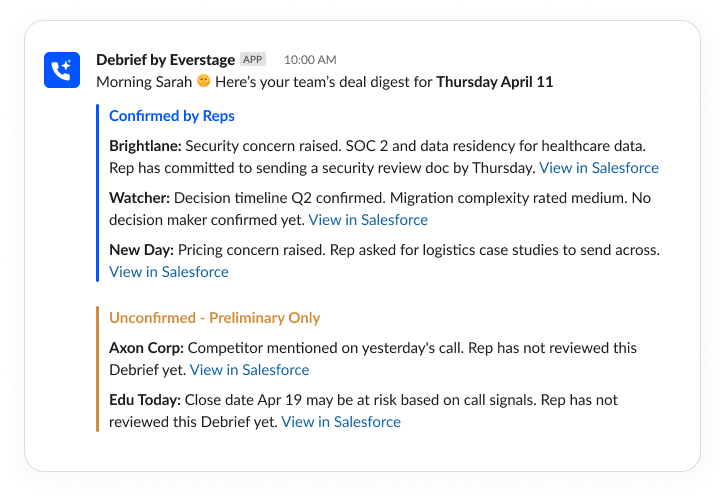
At scale, lets say a 60 person sales team, the digest trims itself.
A lightweight quality panel, probably inside the existing Everstage interface, not a new standalone surface. It would show how many Debriefs confirmed and which deals have stale CRM fields despite recent calls. The manager does not re-open Debriefs for the rep: They can flag the deal for a sync: "This deal's CRM data may need a refresh, consider a quick check-in."
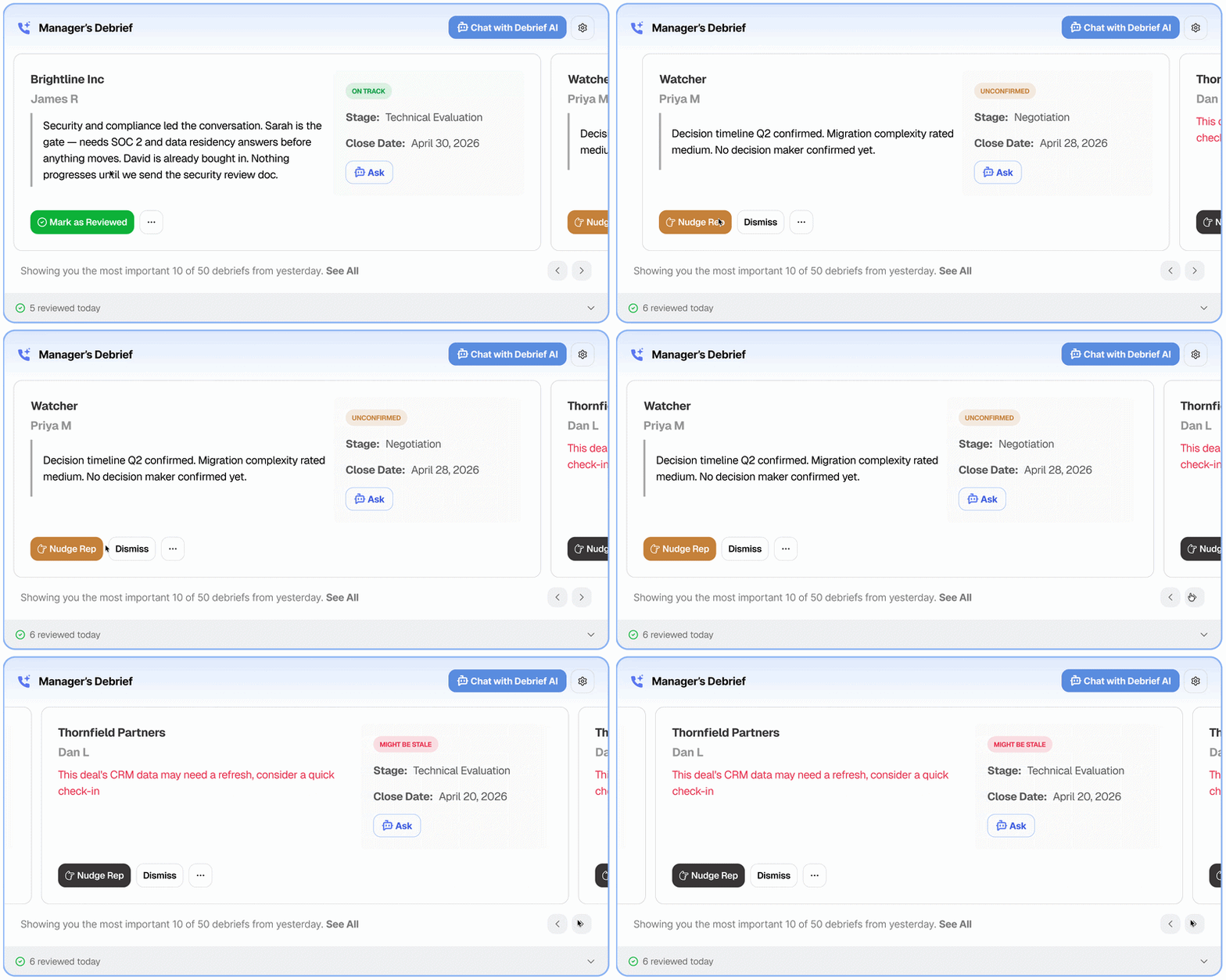
V3 - AI Chat: Manager can chat with the Debrief AI to understand holistic view of their team's performance, or even ask about individual deals.
During research I found that Everstage already embeds directly inside Salesforce, surfacing commission data within the CRM.
This raised a question: should Debrief also surface a contextual banner on the Salesforce opportunity record when a call has just ended?
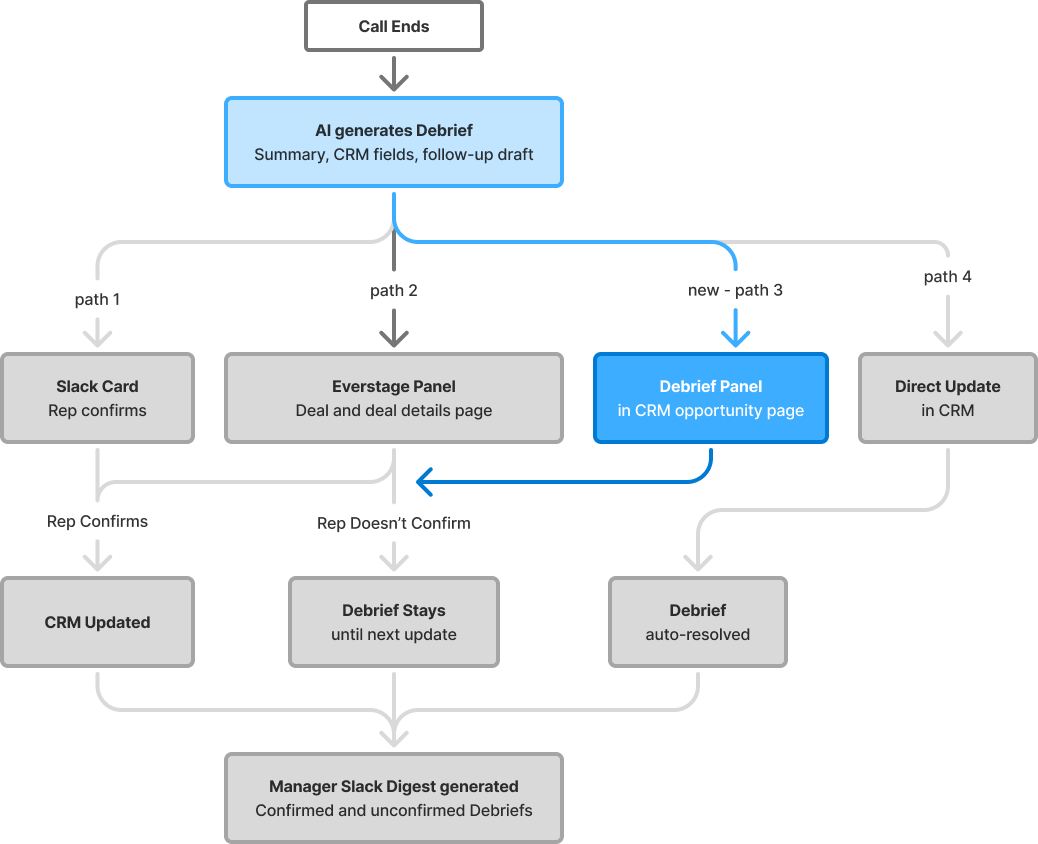
Decision to defer: The rep disciplined enough to open Salesforce right after a call is probably already updating fields directly, which triggers auto-resolve. A CRM banner would mostly appear for people who least need it. So we don't need this at the moment.
Start with the smallest loop that proves the concept: Slack card, rep confirms, CRM updates. That answers whether reps act post-call and whether the AI draft is good enough to edit rather than rewrite.
🏆 Success means post-call admin under 90secs, rep adoption above 80% within 60 days, and managers surfacing deal risks before it is too late to act.
This one was genuinely fun to dig into. :) The research alone took a day, and the more I pulled on the thread, the more I found. Everstage is a surprisingly nuanced product.
I also used this as a chance to experiment with Figma, Figma Make, and Claude Code together. Static screens can't show state, and so much of what makes Debrief work is in the fields updating in real time. Code let me design those decisions instead of deferring them.
Hope you had as much fun reading it as I did building it. 🤗